Your LG TV
Within reach.
A remote for an LG TV running Glasshouse, on Mac, iPhone and iPad.
Click, tap, type, or use a shortcut from any app on your Mac.
Click a button on any device, or press a key, to take over.
OLED65G45LW
ONOFF
TV
3840×2160 @ 60DV
SOURCE
D-PAD
PLAYBACK
VOLUME
PINNED
TV
3840×2160 @ 60HzDV
ONOFF
SOURCE
PINNED
Mac
Or with Homebrew
brew install --cask denisvinciguerra/tap/pane-for-glasshouse Free and open source (MIT). macOS 14 or later. Source code
iPhone and iPad


Free, no in-app purchases. iOS 17 or later.
You need an LG TV running Glasshouse (port 8080 by default). How to add a TV, in the README
Keyboard
Your keyboard is the remote.
On the Mac, and on an iPad with a keyboard, the keys drive the TV.
- Arrows and Gaming profiles, for any keyboard layout.
- A Custom profile: every key your way.
- A key for each pinned item.
- On the Mac, global shortcuts that work from any app.
Settings
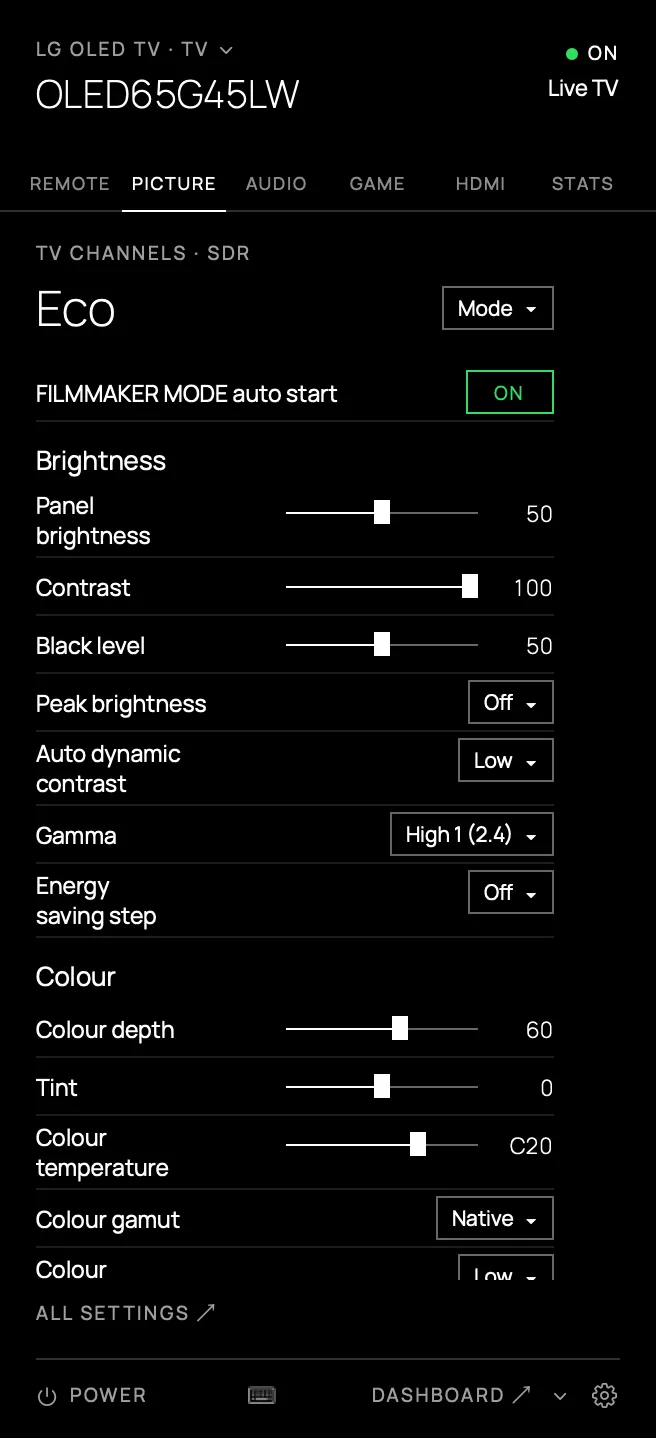
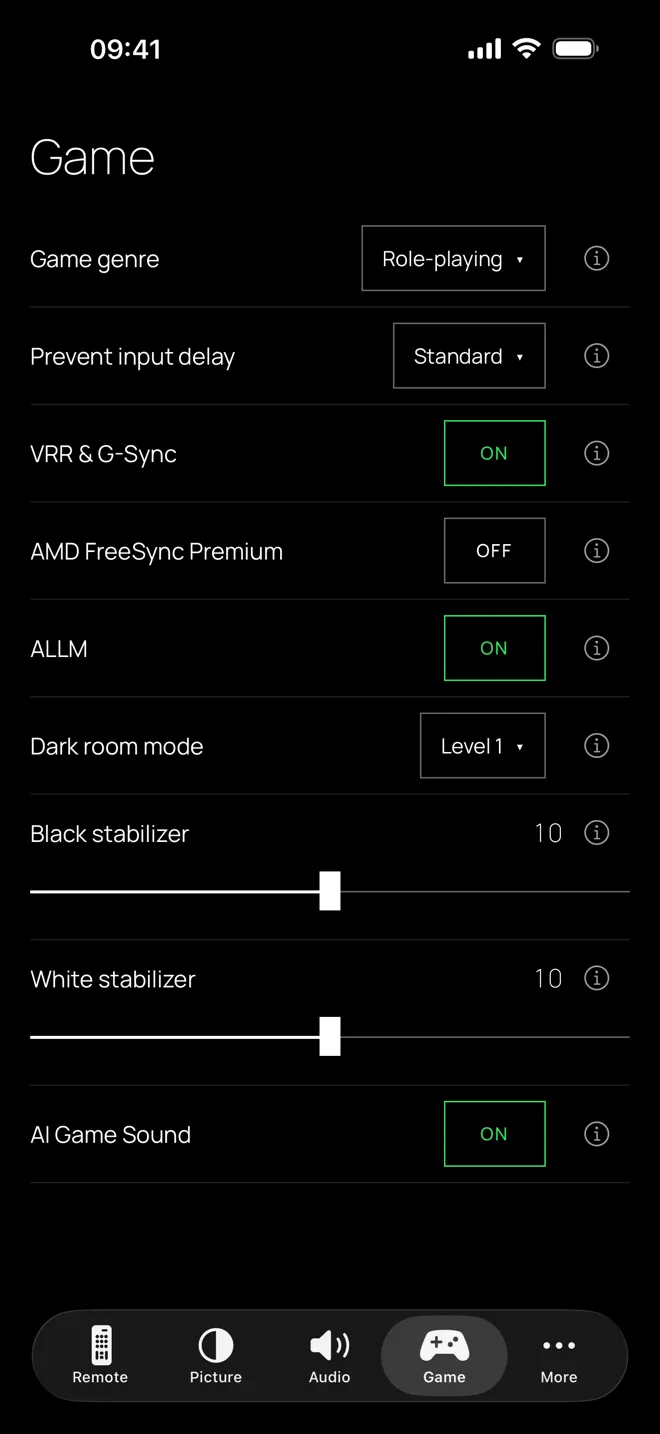
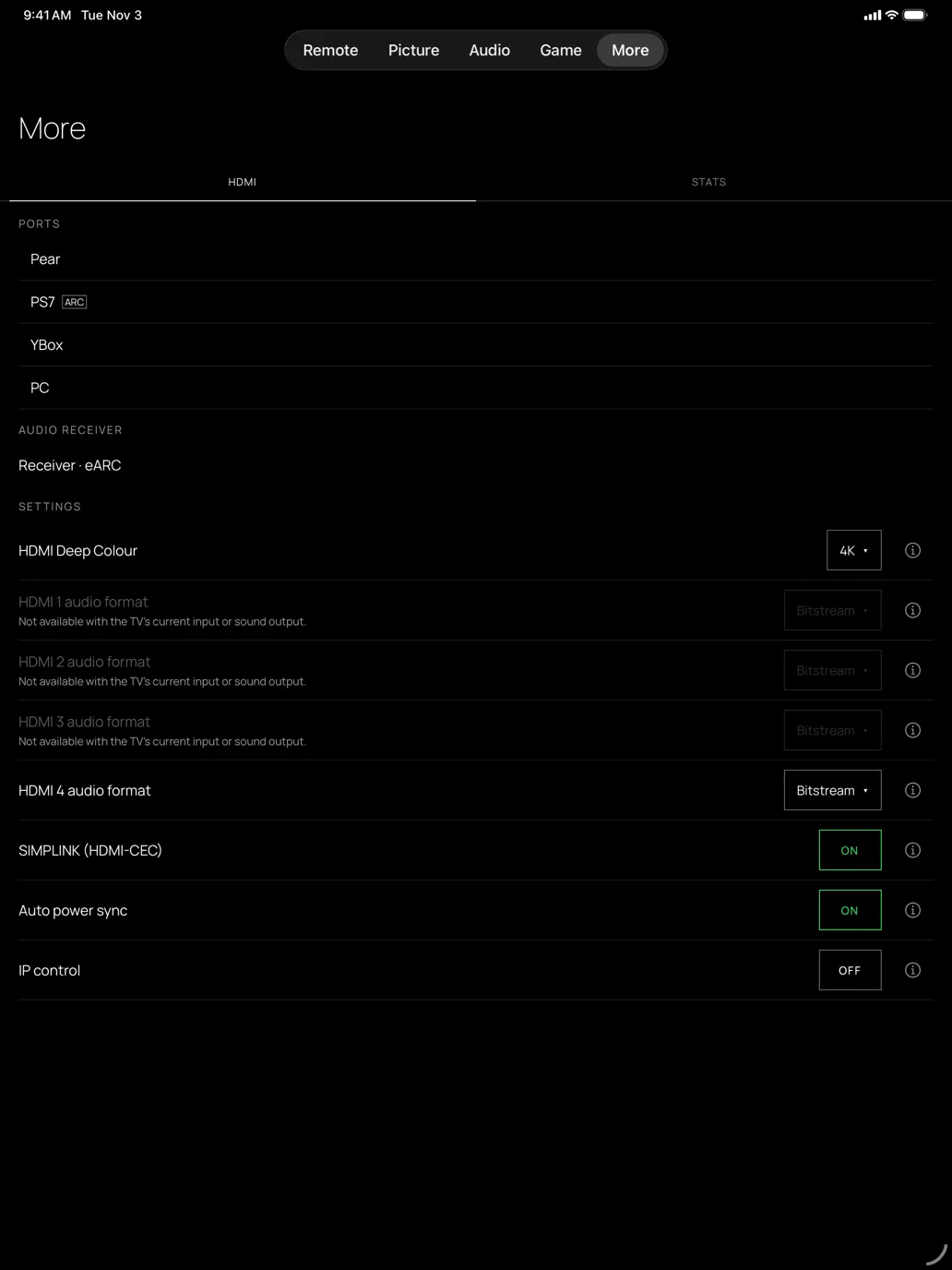
Your TV’s settings, on Mac, iPhone and iPad.
Picture, sound, game, HDMI and live stats, without the dashboard. A setting added to Glasshouse shows up with no app update.
And also
The small things.
-
Pinned items
An action or a sequence on one button, with its key. It turns the TV on first if needed.
-
Power from any state
Standby or deep standby: on the Mac, the power button always works.
-
Several TVs
Add every TV in the house and switch from the header.
-
Dark and light
Pane comes in both.
-
English and French
Pane speaks both.
-
Automatic updates
On the Mac, Pane tells you when a new version is ready. On iPhone and iPad, the App Store does.
Thanks
Built on Glasshouse.
Glasshouse, by Rory Gallagher, does the real work: it is the server running on the TV.
Pane is just a remote that talks to it. Thank you, Rory.
Questions
What is Pane?
A remote for an LG TV running Glasshouse: in your Mac’s menu bar, and as an app on iPhone and iPad.
What does it do?
It is a remote you drive with a tap on iPhone and iPad, and on the Mac with the mouse, the keyboard, or global shortcuts that work from any app. It switches sources, changes Picture, Audio and Game settings, shows HDMI ports and live stats, runs your pinned items, powers the TV from any state and handles several TVs. For anything else, it opens the Glasshouse dashboard on the right tab.
What does it not do?
Anything that belongs to Glasshouse: privacy and ad settings, the home screen, apps, OLED care, the service menu, Home Assistant, screensavers. Those stay in the Glasshouse dashboard, which Pane opens on the right tab.
What do I need?
A Mac with macOS 14 (Sonoma) or later, or an iPhone or iPad with iOS 17 or later, and an LG TV where Glasshouse is already installed.
How do I install Glasshouse on my TV?
Pane does not do that. Follow the Glasshouse installation guide.
Is it made by LG or by Glasshouse?
No. Pane is an independent project, not affiliated with or endorsed by LG Electronics or the Glasshouse project. webOS is a trademark of LG Electronics. Pane sends commands to your TV, including power, so use it at your own risk.
What about my data?
Apart from looking for TVs on your local network and, on the Mac, checking GitHub for updates, Pane only talks to your TVs. A TV’s token is stored in the keychain (macOS or iOS) and only ever sent to that TV. No telemetry, no account.
Is it free?
Yes. Pane is open source under the MIT license, and the code is on GitHub. On iPhone and iPad it is free on the App Store, with no in-app purchases.
Can the iPhone or the iPad wake the TV from deep standby?
Not yet. Waking a TV through the network, and finding it with the usual search, need a permission Apple grants to apps on request. Until Pane has it, the iPhone and the iPad find the TV by sweeping the network and turn it on when it is in Active Standby or Always Ready: keep the TV in Active Standby (Quick Start+ or Always Ready in its settings). The Mac wakes it from any state.
Pane for Glasshouse is an independent project, not affiliated with or endorsed by LG Electronics or the Glasshouse project. webOS is a trademark of LG Electronics.